How Do AI Agents Work?
AI becomes harder to control when it moves from generating an answer to deciding and acting across multiple systems. This distinction between agentic AI and generative AI helps explain why agents require additional tools, permissions and control mechanisms.
An AI agent is a software system that uses an AI model to pursue a goal, select actions, interact with tools and adjust its approach based on the results.
It is what turns a language model from a response generator into part of an active workflow. It is why organizations must evaluate not only what an AI system says, but also what it can access, change or trigger.
Unlike a standard chatbot, an agent may search databases, read files, call APIs, use software interfaces, write code or initiate business processes. Its abilities depend on the model, instructions, tools, permissions, memory and control mechanisms surrounding it.
In this blog, you will learn how AI agents work, what happens when an agent uses a tool, how agents differ from chatbots and automation, why they fail and how organizations can govern them responsibly.
Key Takeaways
- AI agents combine a model, instructions, tools, context and an execution loop.
- The model proposes actions, but surrounding software controls access, execution and permissions.
- Agents differ from basic chatbots because they can act, observe results and adapt across multiple steps.
- Memory improves continuity but can introduce stale, irrelevant or sensitive information.
- Greater autonomy can increase usefulness, cost, latency and the consequences of errors.
- High-impact actions require enforceable limits, monitoring and human approval.
How Do AI Agents Work?
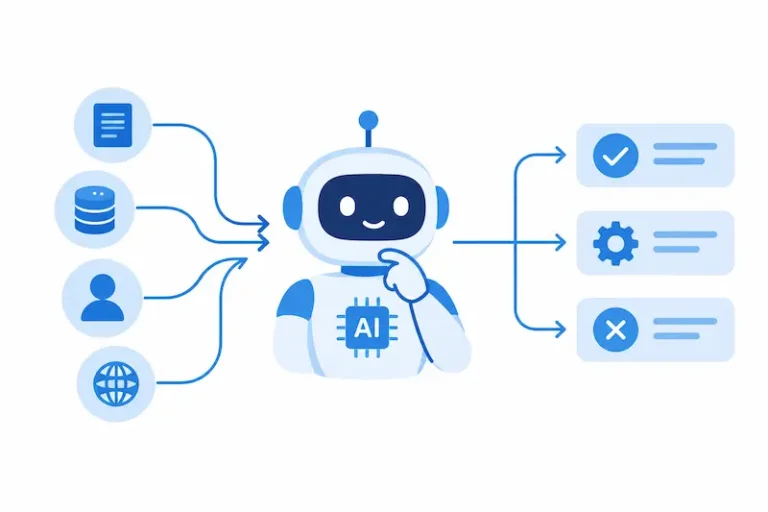
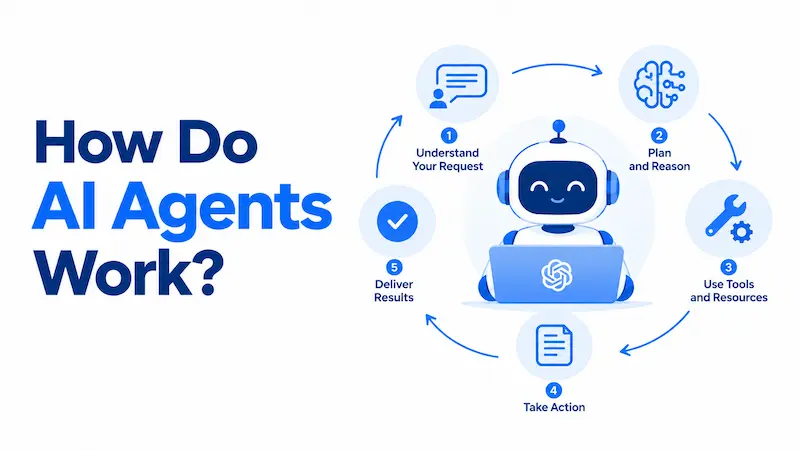
AI agents work by receiving a goal, analyzing the available context, choosing an action, using an approved tool and evaluating the result. They repeat this process until they complete the task, reach a limit or require human input. The model proposes actions, while surrounding software manages execution, permissions and safety controls.
The basic agent loop looks like this:
Goal → Context → Decision → Tool request → Permission check → Action → Observation → Updated decision → Completion
This loop is the central difference between an AI agent and an ordinary generative AI response.
A chatbot may respond once to a question. An agent can search for information, inspect the result, decide that more evidence is needed, use another tool and continue until it reaches a defined outcome.
The agent is not necessarily operating without supervision. Its autonomy depends on the permissions, approval requirements and stopping conditions established by the organization.
What Is an AI Agent?
An AI agent is a goal-directed system that can determine what to do next and take permitted actions in a digital or physical environment. If you’re new to the concept, understanding what an AI agent is provides a useful foundation for the rest of this guide.
The term “AI agent” is used inconsistently. Some products marketed as agents are conventional automations with an AI interface. Others allow a model to select tools, revise plans and continue working with limited human involvement.
A useful distinction comes from Anthropic’s guidance on building effective agents:
- A workflow follows paths defined in advance by software.
- An agent allows the model to direct its process and tool use dynamically.
OpenAI similarly describes agents as systems that independently accomplish tasks on a user’s behalf. Its practical guide to building agents distinguishes agents from single-turn model applications that do not control workflow execution.
In this article, “AI agent” primarily means a modern software agent that uses a generative AI model or large language model to direct a tool-supported task.
Autonomy exists on a spectrum, which is an important idea when understanding agentic AI and how much independent action an AI system can take. An agent may:
- Recommend an action for a human to perform
- Prepare an action and wait for approval
- Execute low-risk actions within defined limits
- Complete a multi-step task with limited supervision
- Coordinate other specialized agents
Calling a system an agent does not reveal how autonomous, capable or safe it is. Those characteristics must be assessed separately.
The Three Layers of an AI Agent
An AI agent is not simply a model with a prompt. It is a system with three functional layers.
| Layer | Primary function | Central question |
| Intelligence layer | Interprets goals and proposes actions | What should happen next? |
| Execution layer | Calls tools and maintains task state | How will the action be performed? |
| Control layer | Applies permissions, approvals and limits | Is the action allowed? |
Intelligence Layer
The intelligence layer commonly includes the AI model, task instructions and the context supplied to the model. It interprets the request and proposes the next step.
The model may decide that it needs to search a document repository, query a customer record or ask the user for missing information.
This decision is not automatically correct. A proposed action may be based on incomplete context, incorrect reasoning or a misunderstanding of the goal.
Execution Layer
The execution layer converts an approved model request into an operation. It includes tools, APIs, software connectors, runtime infrastructure and task-state management.
This layer performs the actual work. The model may propose sending an email, but the connected email service sends it. The model may request a database query, but the database system executes it.
Control Layer
The control layer determines what the agent is authorized to do. It includes identity management, access controls, validation rules, human approvals, transaction limits, logging and stopping conditions.
The control layer should not depend entirely on the model following instructions. Restrictions that must always apply should be enforced through software and access controls.
The Core Components of an AI Agent
A modern AI agent normally combines several components.
| Component | Function | Example |
| Goal | Defines the desired outcome | Resolve a support request |
| Model | Interprets context and proposes actions | Decide whether account data is needed |
| Instructions | Define behavior and boundaries | Never issue a refund without approval |
| Tools | Retrieve information or perform actions | Search CRM, send email, update ticket |
| Context | Supplies task-specific information | User request, policy and account history |
| Memory | Retains or retrieves selected information | Previous interactions or completed steps |
| Orchestrator | Manages the execution loop | Runs tools and returns results |
| Guardrails | Restrict or review behavior | Permission checks and transaction limits |
| Evaluations | Measure performance and risk | Test accuracy and policy compliance |
The AI Model
The model interprets the goal, instructions, available context and descriptions of connected tools. It produces either a user-facing response or a structured request to use a tool.
The model does not inherently possess access to an email account, database, web browser or payment system. The application gives it access through defined interfaces.
People often describe this process as reasoning. In this context, “reasoning” is operational terminology for the model’s ability to process information, make inferences and propose steps. It does not guarantee logical validity, factual accuracy or human-like understanding.
A plan can sound convincing and still be wrong. Agents therefore need verifiable feedback from tools, validation rules and appropriately placed human judgment.
Instructions
Instructions define the agent’s role, priorities, procedures and restrictions. They may specify:
- What the agent is permitted to do
- What evidence it must obtain
- When it must request clarification
- When approval is required
- How it should handle errors
- What conditions indicate completion
For example, a customer service agent might be instructed to retrieve the relevant order before discussing a refund and to escalate refunds above an approved limit.
Clear instructions improve consistency, but prompts should not be treated as enforceable security controls. A critical restriction should also exist in the surrounding software.
Tools
Tools connect the agent to data, software and actions.
| Tool category | Purpose | Examples |
| Retrieval | Obtain relevant information | Search documents, query CRM, read files |
| Action | Change or initiate something | Update records, create tickets, send messages |
| Computation | Process or verify information | Run code, calculate totals, validate data |
| Delegation | Assign specialized work | Call a research or review agent |
A tool normally has a name, description, required inputs and expected output format. Clear definitions help the model determine when and how a tool should be used.
Tool permissions establish the agent’s actual reach. An agent that can read a calendar presents different risks from one that can delete events, invite attendees or make purchases.
Context and Grounding
Context is the information available to the model during a particular step. It may include the original request, system instructions, retrieved documents, recent messages and tool results.
Grounding connects the model’s response or decision to evidence supplied by an external source. That evidence may come from:
| Information source | Example | Main limitation |
| Model parameters | General learned knowledge | May be outdated or inaccurate |
| Retrieved content | Approved documents or knowledge base | Retrieval may miss the correct source |
| Live system data | CRM, inventory or calendar response | Depends on access and system accuracy |
| Stored memory | Earlier interactions or preferences | May be stale, incomplete or inappropriate |
A grounded agent can consult current evidence instead of relying only on information encoded during model training. Grounding can reduce uncertainty, but it does not guarantee that the model will interpret the evidence correctly.
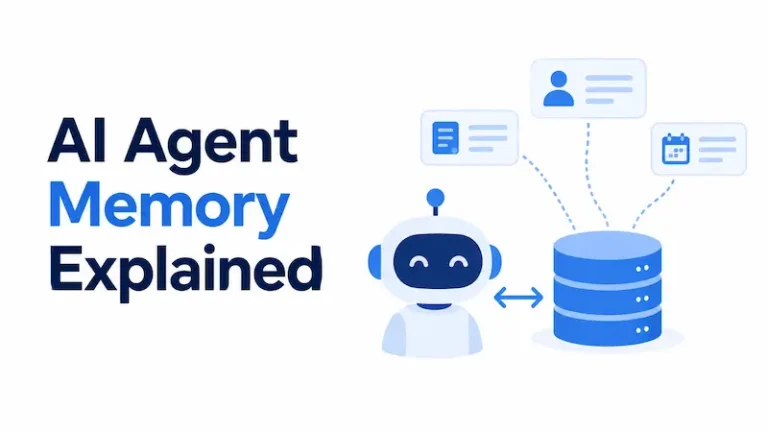
Memory
Memory allows an agent to retain or retrieve information across steps or sessions.
Research literature commonly identifies planning, memory and tool use as important parts of LLM-based agents, including an in-depth survey of AI agents.
Memory may serve different functions:
| Memory type | What it may contain | Main risk |
| Working memory | Current goal and recent tool results | Important context may be displaced |
| Episodic memory | Summaries of previous interactions | Summaries may be inaccurate or stale |
| Semantic memory | Retrieved facts and documents | Retrieval may return irrelevant content |
| Procedural memory | Instructions, routines or reusable skills | Procedures may be outdated or unauthorized |
These categories are useful for understanding system design, but terminology varies across platforms. Not every agent uses every form of memory.
Agent memory is also not the same as human memory. Information is typically stored outside the model and retrieved when the application determines that it may be relevant.
The Orchestrator
The orchestrator is the software that manages the interaction between the model and its environment. It usually:
- Sends the goal and context to the model.
- Receives a proposed action.
- Checks whether the action is permitted.
- Executes the requested tool.
- Returns the result to the model.
- Records the action and updated task state.
- Determines whether another cycle may run.
Current OpenAI agent documentation distinguishes among managed runtimes, development kits and direct model integrations. These options differ in who manages tools, sessions, approvals and execution, but each requires orchestration.
What Happens When an AI Agent Uses a Tool?
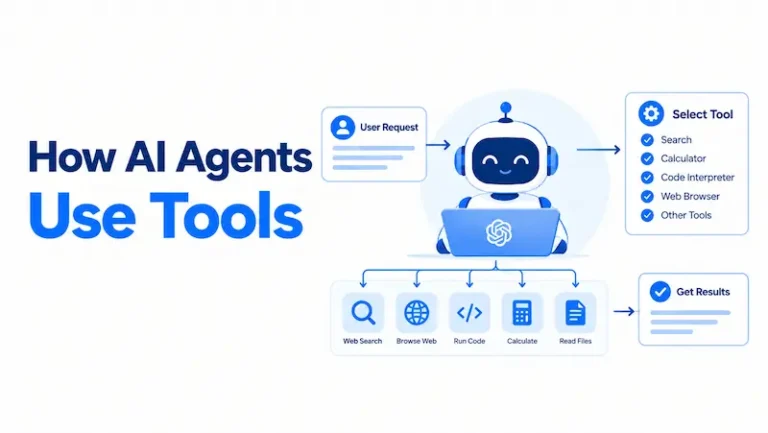
The model normally does not execute an external function itself. It produces a structured request that the host application can inspect and process.
For example, an agent arranging a meeting might generate a request resembling:
{
“tool”: “check_calendar”,
“arguments”: {
“participants”: [“person_a”, “person_b”],
“date_range”: “2026-09-15/2026-09-19”
}
}
The tool-use process then works as follows:
- The model generates a request. It selects a tool based on the goal, instructions and available tool descriptions.
- The application validates the request. It checks the tool name, arguments, permissions and applicable policies.
- The external service performs the operation. The calendar application retrieves the requested availability.
- The result returns to the agent. The orchestrator adds the result to the working context.
- The model chooses the next step. It may select a suitable time, request more information or call another tool.
- The system checks for completion. It stops when the goal is met, a limit is reached or human input is required.
This distinction matters because it identifies where controls can be enforced. The model proposes an action, but the application decides whether and how that action is executed.
What Actually Controls an AI Agent?
The model influences the agent’s behavior, but it does not control every part of the system.
| Decision or action | Model’s role | Application’s role |
| Interpret the goal | Primary interpreter | Supplies instructions and context |
| Propose the next action | Selects an action | Restricts available choices |
| Access a database | Requests access | Authenticates and executes |
| Send a message | Drafts or requests | Validates, approves and sends |
| Store information | Identifies possible relevance | Controls storage and retention |
| Approve a sensitive action | Should not be final authority | Enforces policy or requests human approval |
| End the task | May report completion | Applies exit rules and limits |
This division of responsibility is one of the most important principles in agent design. A capable agent still requires reliable application controls.
AI Agents Versus Chatbots, Assistants and Automation
These systems overlap, but they are not interchangeable. Understanding the differences between AI agents and chatbots is especially useful because both can generate natural-language responses while having very different capabilities.
| Capability | Basic chatbot | Rule-based automation | AI assistant | AI agent |
| Generates natural-language responses | Yes | Usually no | Yes | Yes |
| Follows a fixed process | Sometimes | Yes | Often | Can |
| Selects actions dynamically | Limited | No | Limited | Yes |
| Uses external tools | Sometimes | Yes | Often | Yes |
| Adapts after tool results | Limited | Through coded rules | Sometimes | Yes |
| Performs multi-step work | Sometimes | Yes | With user guidance | Yes |
| Operates without continuous direction | Rarely | Yes, within rules | Limited | Potentially |
A chatbot becomes more agent-like when it can choose tools, act on their results and continue until it reaches a goal or stopping condition.
An AI assistant usually works interactively with a user. Understanding the differences between AI agents and AI assistants helps clarify how much autonomy each system typically has. An assistant may recommend or prepare actions while leaving final decisions to the person. An agent can be designed to continue with less step-by-step direction.
Traditional automation remains preferable when a process is stable, repeatable and fully expressible as rules. Understanding the difference between AI agents and traditional automation can help determine when a workflow actually needs model-directed decisions. A payroll calculation, for example, should generally rely on deterministic logic rather than a model interpreting the rules on every run.
Common Types of AI Agents
There is no universally accepted classification, but several practical categories appear across current systems. These types of AI agents differ mainly in how they plan, use tools, maintain context and interact with their environment.
Reactive Agents
Reactive agents respond to current inputs without maintaining an extensive plan or persistent memory. They suit narrow tasks where the required response depends mainly on the immediate situation.
Planning Agents
Planning agents break a goal into subtasks and determine a sequence of actions. They may update the plan when new information becomes available.
Tool-Using Agents
Tool-using agents interact with external services, databases, code environments or software interfaces. Most modern business agents fall into this category.
Workflow-Constrained Agents
These agents operate inside a process whose main stages are defined by software. The model may make decisions within each stage without being allowed to redesign the entire workflow.
Multi-Agent Systems
Multi-agent systems distribute work among multiple agents. A coordinating agent may delegate research, analysis or verification to specialized workers.
More agents do not automatically produce better results. Multi-agent systems create additional messages, costs, dependencies and failure points.
Embodied Agents
Embodied agents interact with physical environments through robots, sensors or other devices. Their safety considerations extend beyond digital information and software actions.
How Agents Plan and Make Decisions
Planning does not necessarily mean that an agent creates a complete and correct plan before acting. Several patterns are possible.
Plan Then Act
The agent divides the goal into subtasks before using tools. This can improve transparency, but the initial plan may become obsolete when the agent encounters new information.
Act and Reassess
The agent takes one action, observes the result and decides what to do next. This supports adaptation but can increase the number of model calls and the risk of compounding errors.
Fixed Workflow With Agentic Decisions
Software determines the main sequence, while the model handles selected decisions within it. This provides greater predictability than a fully open-ended agent.
Orchestrator and Workers
A central agent dynamically decomposes the task, delegates subtasks and synthesizes the results. Anthropic describes this as an orchestrator-worker pattern that can suit tasks where the required subtasks cannot be predicted in advance.
Hypothetical Example: An AI Vendor Risk Review Agent
Consider an organization using an agent to support an initial review of a proposed AI vendor. This is an illustrative scenario, not a real case study.
1. Receive the Goal
The agent receives a request to assess whether the vendor has supplied the evidence required for an internal risk review.
2. Retrieve the Review Criteria
It accesses the organization’s approved questionnaire, risk policy and documentation requirements.
3. Examine the Vendor Documents
The agent reads submitted security, privacy, governance and model documentation. It identifies which requested fields have supporting evidence.
4. Detect Missing Information
If the vendor has not documented its retention period or incident-notification process, the agent flags the omissions instead of inventing answers.
5. Prepare a Provisional Assessment
The agent maps the available evidence to the organization’s criteria and prepares a provisional risk classification.
6. Request Human Review
Because vendor approval may affect legal, security and operational risk, the agent sends the assessment to an authorized reviewer. It does not approve the vendor independently.
7. Record the Decision
After the reviewer decides, the system stores the evidence, decision, approver and date in the approved recordkeeping system.
This example shows how planning, retrieval, tools, grounding, permissions and human oversight operate together. The agent accelerates evidence collection and analysis, while accountable people retain authority over the consequential decision.
When AI Agents Add Value
Agents are most useful when a workflow includes several of the following characteristics:
- Multiple steps that depend on intermediate results
- Unstructured information, such as documents or messages
- Context-sensitive decisions
- Several systems or data sources
- Routine exceptions that are difficult to encode
- Paths that cannot be fully predicted in advance
Potential applications include customer support triage, software development, document review, research assistance, IT operations and administrative coordination. These AI agent examples show how the same underlying agent architecture can support very different workflows.
The correct question is not whether an organization needs “AI agents.” It is whether a particular workflow benefits from model-directed decisions.
When an AI Agent Is the Wrong Choice
An agent can add unnecessary uncertainty, expense and operational complexity when a simpler approach would work.
| Workflow condition | Better starting point |
| One clear question and one response | Single model call |
| Stable and predictable sequence | Rule-based automation |
| Several known stages with limited judgment | AI-assisted workflow |
| Variable path requiring tools and feedback | AI agent |
| High-impact decision with uncertain criteria | Human-led process with AI support |
| Unclear outcome or ownership | Redesign the process first |
Agentic systems often exchange predictability, speed and cost for flexibility. Anthropic recommends beginning with the simplest workable approach and adding agentic complexity only when it produces measurable improvement.
Why AI Agents Make Mistakes
Agents inherit model limitations and introduce additional system-level failure modes.
Incorrect Reasoning or Unsupported Output
A model may reach the wrong conclusion or generate information that is not supported by the available evidence. Tool access can reduce uncertainty, but it does not guarantee correct interpretation.
Poor Tool Selection
An agent may select the wrong function, submit incorrect arguments or use the correct tool at the wrong point in the workflow.
Compounding Errors
One incorrect observation can influence later steps. Longer tasks create more opportunities for early mistakes to propagate.
Incomplete or Contaminated Context
The agent may lack a necessary document, retrieve irrelevant memory or interpret untrusted content as authoritative instructions.
Prompt Injection
Malicious or misleading instructions may appear in webpages, documents, emails or tool outputs. An agent processing that content may be manipulated into revealing information or requesting unintended actions.
Excessive Permissions
An agent with broad credentials can cause more harm than one restricted to the minimum access necessary. Risk increases when uncertain model decisions are connected to powerful tools.
Memory Failure
Stored information may be outdated, incorrectly summarized or associated with the wrong user or task. Retaining unnecessary data can also create privacy and security concerns.
Unclear Completion Criteria
Without defined exit conditions, an agent may repeat actions, consume excessive resources or report success before verifying the result.
Tool or Service Failure
An external API may be unavailable, return incomplete data or change its response structure. The agent needs a defined way to detect failure and transfer control.
Cost and Performance Considerations
Agent tasks may require several model calls, retrieval operations and tool executions. Every additional cycle can increase:
- Response time
- Model usage
- Infrastructure cost
- External API charges
- Monitoring requirements
- Opportunities for failure
A multi-agent architecture can amplify these effects because agents exchange additional context and perform separate model calls.
Organizations should evaluate cost per successfully completed task, not just cost per model request. A cheap model that frequently retries or produces unusable results may cost more at the workflow level than a more capable model.
How to Control AI Agent Risks
AI agent governance should focus on what the system can do, which resources it can access and how errors could affect people or operations.
The NIST AI Risk Management Framework provides a voluntary structure for governing, mapping, measuring and managing AI risks. Organizations can use this structure to assess risks across an agent’s design, testing, deployment and monitoring lifecycle.
The following table provides editorial guidance for mapping common agent risks to controls:
| Risk | Primary control | Verification method |
| Unauthorized action | Least-privilege access | Permission testing |
| Incorrect tool request | Schema validation and allowlists | Adversarial tool-use tests |
| High-impact mistake | Human approval checkpoint | Approval-log review |
| Prompt injection | Treat external content as untrusted | Injection testing |
| Repeated execution | Time, turn and spending limits | Forced-loop testing |
| Sensitive-data exposure | Data minimization and output controls | Privacy and leakage tests |
| Untraceable behavior | Tool-call and approval logs | Trace inspection |
| Performance degradation | Continuous evaluations | Production monitoring |
The OWASP agentic AI guidance also discusses threats that arise when AI systems plan, use tools and interact with external environments.
Use Minimum Necessary Permissions
Give the agent and each tool only the access required for the assigned task. Separate read and write permissions. Avoid sharing a powerful credential across unrelated functions.
Enforce Rules Outside the Model
Do not rely solely on a prompt telling the agent not to perform an action. Use authorization checks, constrained tool schemas, transaction limits and policy enforcement in software.
Require Approval for Consequential Actions
Human approval is appropriate for financial transactions, account deletion, external communications, access changes, legal submissions and other sensitive or difficult-to-reverse actions.
Approval should occur before execution.
Validate Tool Inputs and Outputs
Check model-generated arguments before executing a tool. Confirm that returned information has the expected structure and source before adding it to the agent’s context.
Establish Stopping Conditions
Set maximum turns, time limits, spending limits and retry thresholds. Define when the agent must stop, request clarification or transfer control to a person.
Preserve Traceability
Record the user request, model decisions, tool calls, approvals, results and final outcome at a level appropriate to the risk. Logs should be protected against unauthorized access and unnecessary retention.
Assign Responsibilities
| Responsibility | Suitable owner |
| Define intended use | Business process owner |
| Configure tools and permissions | Technology and security teams |
| Approve risk controls | AI governance or risk function |
| Review privacy implications | Privacy or data protection function |
| Authorize consequential decisions | Accountable human decision-maker |
| Monitor incidents and failures | Operations and security teams |
| Review continued suitability | Business owner and AI governance function |
Exact ownership depends on the organization, jurisdiction and risk level. The purpose of the matrix is to prevent accountability from being assigned vaguely to “the AI.”
How to Evaluate Whether an Agent Works
A successful demonstration is not enough to justify deployment. Evaluation should reflect realistic work, uncommon conditions and foreseeable misuse.
A survey of LLM-based agent evaluation identifies planning, tool use, reflection and memory among the capabilities that evaluations may need to examine. The paper also identifies continuing challenges involving robustness, safety and cost efficiency.
Start with representative test cases. Include normal requests, incomplete information, conflicting instructions, unavailable tools, malicious content and situations that require escalation.
Measure at least these dimensions:
| Dimension | Evaluation question |
| Outcome | Did the agent complete the correct task? |
| Process | Did it use appropriate tools and required steps? |
| Evidence | Were decisions grounded in valid information? |
| Safety | Did it remain within permissions and approval rules? |
| Reliability | Can it handle realistic variations consistently? |
| Recovery | Does it respond safely to failure? |
| Efficiency | Were time, model calls and costs proportionate? |
| Traceability | Can reviewers reconstruct what happened? |
Testing should distinguish model errors from system errors. A failure may result from unclear instructions, a poorly described tool, unavailable data, excessive permissions, faulty orchestration or the model itself.
Production monitoring is also necessary. Connected systems, policies, user behavior, data and model performance can change after deployment.
A Responsible Adoption Path
Organizations do not need to begin with full autonomy.
- Observe: The agent analyzes a task but cannot take action.
- Recommend: It proposes an action for a person to perform.
- Prepare: It drafts or configures the action but requires approval.
- Execute within limits: It performs low-impact, reversible actions under defined constraints.
- Expand conditionally: Permissions increase only when evaluation evidence supports the change.
At each stage, compare results with the previous process. Assess accuracy, completion rate, escalation quality, cost, incidents and control performance.
Greater autonomy should be earned through evidence rather than assumed from the model’s apparent fluency.
Conclusion
AI agents work by combining a model with instructions, tools, context, memory and a controlled execution loop. The model interprets the goal and proposes actions. The surrounding application determines what the agent can access, validates requests, executes approved tools and records the results.
Their value comes from handling variable, multi-step work that is difficult to automate with fixed rules. Their risk comes from connecting uncertain model decisions to systems that can change data, communicate with people or initiate consequential actions.
Before deploying an agent, define its purpose, assign an accountable owner, restrict its tools, minimize permissions, establish approval points and test the complete action sequence. If a single model call or deterministic workflow can solve the problem reliably, use the simpler system.
Organizations preparing to adopt agents should build knowledge in AI governance, risk assessment, human oversight and control testing before expanding autonomy. Understanding how agents work is the first step. Knowing how to govern what they can do is the more consequential one.