How AI Agents Use Tools: Function Calling Explained
A language model that can only generate text has a hard constraint: it cannot act on the world. It cannot check a live stock price, run code, write to a database, or send an email. Tools remove that constraint. When an AI agent uses a tool, it moves from describing what could be done to actually doing it, and those actions affect real systems in real time.
Tool calling is the mechanism through which an AI model stops describing what could be done and starts doing it. The model reads a request, decides which external function to invoke, produces a structured JSON output specifying the function name and its arguments, and then your application runs the function and returns the result. That cycle repeats until the task is complete.
A system without tools can explain things. A system with tools can do things. Every production decision about what an agent can and cannot do flows from understanding this cycle.
In this blog, you will learn how AI agents work and how the function-calling mechanism works step by step, what the ReAct reasoning loop is and why it matters, what tool schemas are and why their quality shapes agent reliability, how the Model Context Protocol has standardised tool integration across the industry, which categories of tools exist and when to use each, and what security risks you need to address before deploying any tool-enabled agent.
Key Takeaways
- Tool use turns AI agents from text generators into systems that can query databases, search the web, write files, and trigger real-world actions across external services.
- The core mechanism is function calling: the model outputs a structured JSON request, your application executes it, and the result is returned to the model to inform the next step.
- Tool schemas, written in JSON Schema, define each tool’s name, purpose, and parameter constraints, and are the single biggest factor in whether the model reliably selects the right tool.
- The ReAct framework (Reason + Act), published at ICLR 2023, describes the repeating Thought-Action-Observation loop that underpins most production agentic systems today.
- Anthropic introduced the Model Context Protocol (MCP) in November 2024 as an open standard for connecting AI agents to external tool servers; within a year, OpenAI, Google, and Microsoft had adopted it, and Anthropic donated governance to the Linux Foundation in December 2025.
- Security guardrails, including scoped permissions, validated inputs, and human approval for irreversible actions, are not optional refinements; they are load-bearing parts of any deployed agent architecture.
What Tool Use Actually Means
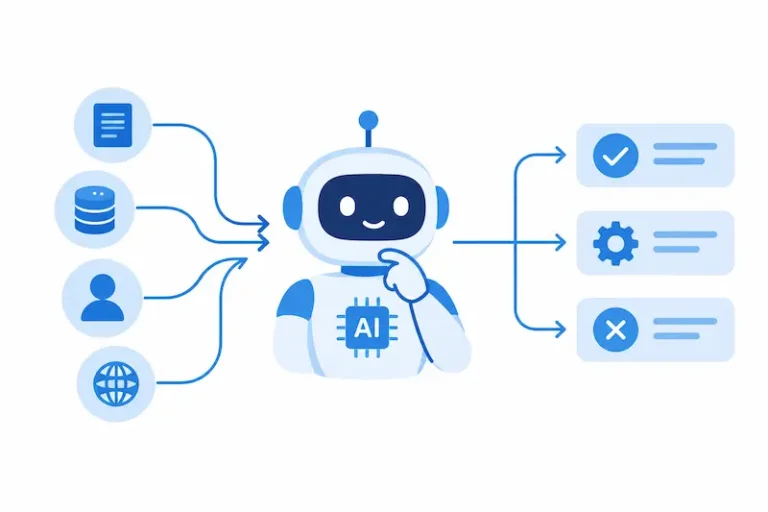
Tool use is the mechanism that allows a language model to interact with and affect the outside world through code. The modern implementation of this is often called function calling: the LLM acts as a reasoning engine that translates a user’s natural language request into a structured, executable function call, which the application then runs and feeds back into the conversation.
Two things in that definition deserve emphasis. First, the model never touches external systems directly. It outputs structured JSON specifying which function to call and with what arguments, and your application code handles actual execution. This separation makes tool calling viable for production applications where agents need access to customer data, internal systems, and third-party services.
Second, the intelligence stays inside the model. The model decides whether to use a tool, which tool to use, and what inputs to provide. The external function executes what it is instructed to do and returns a result. Neither side understands the other’s internals; they communicate through a defined interface. This division of responsibility is what makes tool-enabled agents both powerful and auditable.
One distinction worth clarifying before going further: an AI agent is not the same as an LLM. An LLM is the reasoning component at the centre of an agent. The agent is the broader system, combining that LLM with memory, a toolset, and an execution loop. Tools are what give the agent its reach beyond the context window.
How a Tool Call Works: The Five-Step Cycle
Function calling is the technical mechanism that allows an agent to take action. Think of the agent as the intelligent system, the brain that reasons and plans, and the function calls as the agent’s hands, the specific actions it can perform in the real world.
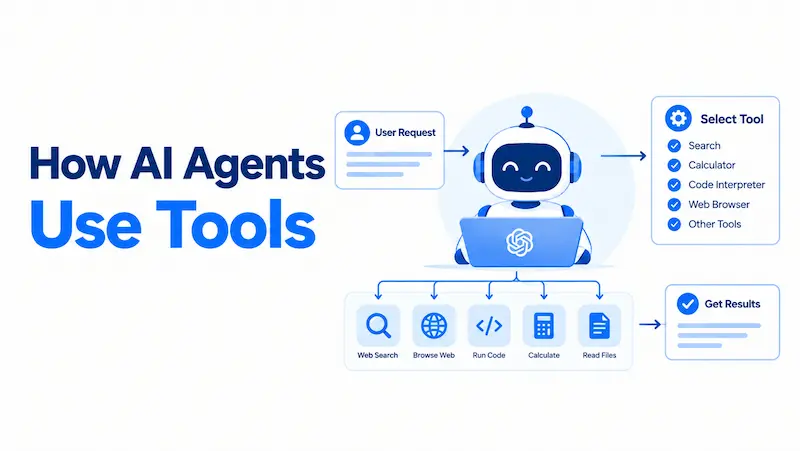
The cycle follows five steps:
- The application sends a request to the model with tool definitions attached. The model receives the user’s message alongside a list of available tools, each described by a name, a natural-language description, and a parameter schema.
- The model reasons about the request and decides whether a tool is needed. If the answer comes directly from the model’s existing knowledge, it responds without calling any tool. If not, it identifies the correct tool and constructs a call.
- The model outputs a structured tool call. This is a JSON object containing the tool name and the argument values the model has inferred from the conversation. The model does not execute this call itself.
- Your application executes the function and captures the result. Your code runs the function, whether that is an API call, a database query, or a code execution step, and collects the returned data.
- The result is returned to the model as a new observation. The model reads the result and decides whether the task is complete or whether another tool call is needed. If the task is multi-step, the cycle restarts from Step 2.
The process follows a structured loop that illustrates how AI agents work: the model recognizes when a tool is needed, selects the right one, builds a request, processes the response, and delivers a result to the user.
A Concrete Illustration
The following is a hypothetical scenario, not a real case study, but it reflects how this cycle plays out in a realistic deployment.
A user asks a customer service agent: “What is the delivery status on order 4821, and can you flag it for priority review?” The model receives that request alongside three tool definitions: get_order_status, flag_order, and send_notification. It reasons that the first step is to check the status, so it emits a structured call to get_order_status with the argument order_id: “4821”. The application runs the database query and returns a JSON object showing the order is delayed by three days. The model reads the observation, reasons that the user also requested a flag, and emits a second call to flag_order with order_id: “4821” and priority: “high”. After that call succeeds, the model synthesises both results into a single, clear response.
Two tool calls, one user message, and no manual intervention. This is what a tool-enabled agent does in a production environment.
The ReAct Loop: How Agents Reason Through Multiple Steps
Most real tasks require more than a single tool call. A research query might need a web search, then a database lookup, then a code execution step to format the results. The structure governing this multi-step behaviour is the ReAct framework.
The ReAct paper, introduced by Yao et al. (2022), provides a more effective approach by explicitly combining reasoning steps with actions within the agent’s operational cycle. ReAct stands for “Reason + Act”. Its core principle is to augment the action space of an agent with an internal reasoning space. At each step, the agent does not just decide what to do next; it first articulates why.
The framework defines an agent’s execution as a repeating cycle of three operations: Thought, Action, and Observation. In each cycle, the model produces a Thought, an explicit reasoning step that interprets the current state and determines what to do next. It then selects an Action, a tool invocation that interacts with the external environment. The tool’s return value becomes an Observation, which is appended to the context and informs the next reasoning step. This cycle repeats until the agent determines that the task is complete or that it cannot proceed.
The significance of this structure is self-correction. If a tool returns an unexpected result, the model incorporates that observation into its next thought and adjusts the plan. A single-pass approach cannot do this; the ReAct loop can. The implementation code is available on GitHub, and the approach remains the foundational reference for most agentic frameworks in use today, including LangChain, LangGraph, AutoGen, and CrewAI.
Agents also decide when not to call a tool. The crucial decision to call or not to call a tool lies with the LLM. LLMs can strategically augment their internal knowledge, skills, and abilities by utilizing external tools, but they exercise agency in making that decision. Well-written tool descriptions help by telling the model explicitly when a tool is appropriate and, equally important, when it is not.
Tool Schemas: What the Model Needs to Know
Before a model can call a tool, it needs a formal definition of that tool. Implementation requires JSON schema definitions for each tool, an execution loop with state management, parameter validation before execution, and detailed tool descriptions the model uses to decide when and how to invoke each function.
Every tool definition supplies three components.
A name that the model uses to identify and request the function. Names should be precise and unambiguous. search is too generic. search_product_catalogue removes ambiguity immediately.
A description written in plain language that tells the model when to use this tool, what it returns, and when not to use it. The description is the most consequential element because it governs tool selection before any schema validation takes place. If a tool’s description does not clearly state what the tool does, when to call it, and what it is not designed for, the model will guess, and those guesses can fail silently in production.
An input schema in JSON Schema format that specifies each parameter’s data type, whether it is required, and any constraints on acceptable values. The schema acts as a contract between the model and your application code. Function calling and tool use in AI agents depend on JSON Schema to define parameter types, required fields, and validation rules that enable reliable agent-to-tool communication.
Vague or overlapping descriptions are the most common cause of wrong tool selection. A name like get_data paired with a description like “retrieves data” tells the model nothing about when to use the tool or what “data” means in context. The name and description together must reduce ambiguity to the point where the model cannot reasonably misinterpret them.
A function is a specific kind of tool, defined by a JSON schema. A function definition allows the model to pass data to your application, where your code can access data or take actions suggested by the model. OpenAI’s function calling documentation provides current implementation guidance, and the structural approach of defining tools with names, descriptions, and JSON Schema parameters is consistent across Anthropic, Google, and most major providers.
Types of Tools AI Agents Use
Most agent tools fall into six categories, each suited to a different kind of work. These categories represent a practical mental model rather than a universal taxonomy. The same is true when comparing different types of AI agents, because frameworks and architectures classify agent systems in different ways. The table below maps each category to its primary use case, a representative example, and its relative security risk. The security column is frequently underweighted until something goes wrong.
| Tool Category | Best For | Example | Security Risk |
| Web search | Live information, recent facts, current documentation | Search API integrations | Low (read-only) |
| Retrieval | Domain-specific internal knowledge, documents, policies | Vector or knowledge graph queries | Low to medium |
| Computation | Deterministic workflows, calculations, data transformation | Code interpreters, math libraries | Medium (execution) |
| File | Reading and writing files, producing artifacts | Filesystem operations, object storage | Medium to high (writes) |
| Computer use | Browser or desktop UI automation | Screen agents, browser drivers | High (broad system access) |
| Business and productivity | Real workflow execution | Email, calendar, CRM, ticketing APIs | High (external effects) |
These categories represent a practical mental model rather than a universal taxonomy, as Neo4j’s agent tools guide notes: different frameworks carve the space differently. OpenAI groups tools by execution location (hosted, function, and MCP), Anthropic by client-side versus server-side, and LangChain by functional domain. What matters is that you have a clear map of what each tool does, not that your map matches anyone else’s.
The practical implication is direct: scope the toolset to the job. A research agent reaches for web search, file access, and code execution. A finance copilot stays narrower: structured database access and policy retrieval, with approval workflows gating any write. For more real-world AI agent examples, including customer service, software engineering, finance, research, and other business workflows, see our examples guide. The more precise the toolset, the more reliable and predictable the agent becomes.
The Model Context Protocol: One Standard for All Integrations
Until recently, every tool integration required bespoke code for each combination of agent framework and external service. Connecting a LangChain agent to a CRM meant writing a LangChain connector. Connecting the same agent to Slack meant writing a separate one. The maintenance burden scaled directly with the number of services.
The Model Context Protocol (MCP) is an open standard, open-source framework introduced by Anthropic in November 2024 to standardise how artificial intelligence systems, particularly large language models, integrate with and access external tools, systems, and data sources. Think of MCP as “USB-C for AI applications”, a universal connector that allows any AI model to communicate with any tool through a single, standardised interface. Before MCP, connecting AI models to external systems required custom integrations for each combination of model and tool.
The adoption curve moved faster than most open standards. Anthropic launched MCP in November 2024. OpenAI adopted it in April 2025. Microsoft integrated it into Copilot Studio in July 2025. AWS added support in November 2025. By March 2026, all major providers were on board. Further technical details are available in the official MCP specification.
The December 2025 donation of MCP to the Agentic AI Foundation (AAIF) under the Linux Foundation represents a watershed moment in MCP’s evolution. The AAIF was co-founded with Block and OpenAI, and joined by Google, Microsoft, AWS, and Cloudflare as members, ensuring MCP remains a vendor-neutral standard rather than any single company’s proprietary protocol.
MCP and function calling address different layers of the same problem. Function calling is a model-side capability: the LLM emits a structured call when provided with tool definitions. MCP is a server-side protocol: it standardises how tools are described, hosted, and invoked. The agent framework reads tool definitions from an MCP server, passes them to the model in function-calling format, and routes the model’s structured calls back to the server. MCP is the transport layer; function calling is the interface the model uses to communicate.
The practical effect for teams building agents: write the tool integration once, expose it through an MCP server, and any MCP-aware agent, regardless of which LLM it uses, can access it without additional integration work.
Choosing the Right Tools: A Decision Framework
Many agent deployments fail not because the tools are technically broken, but because the wrong tools were selected for the job, or too many tools were provided at once. The matrix below is editorial guidance for scoping an agent’s toolset before deployment. It is not a validated research instrument; it is a practical decision aid based on general security and systems design principles.
Tool Scope and Oversight Matrix
| Task Type | Data Sensitivity | Action Reversibility | Recommended Oversight |
| Read-only public information retrieval | Low | No state change | Autonomous; log all calls |
| Read-only internal retrieval | Medium | No state change | Autonomous; audit trail required |
| Computation or sandboxed code execution | Low to medium | Reversible (run again) | Autonomous with sandboxing |
| File writes | Medium to high | Partially reversible | Autonomous plus confirmation for overwrites |
| External API writes (CRM, calendar, ticketing) | High | Reversible with effort | Human-in-the-loop for first execution |
| Destructive or financial actions | High | Irreversible | Human approval required every time |
Three principles govern the framework. First, match the toolset to the task: every additional tool definition consumes context window tokens and adds selection ambiguity, so give the agent only what it needs for the task at hand. Second, scope permissions to the minimum required, the same principle that governs service accounts in infrastructure. Third, treat irreversibility as the deciding criterion for oversight: an action that can be undone can be automated more aggressively than one that cannot.
Security Risks and Guardrails
Tool use substantially expands the attack surface of any AI system. When an agent can send messages, write data, call APIs, or trigger workflows, a failure in judgment or a successful attack can have real consequences.
The OWASP Top 10 for LLM Applications designates prompt injection as LLM01:2025, the highest-priority vulnerability in its classification for large language model security risks. The classification reflects community consensus that prompt injection is a fundamental architectural risk, not an implementation flaw. When AI systems were simple chatbots, a successful injection produced an embarrassing response. With tool-enabled agents, a successful prompt injection can exfiltrate confidential data from knowledge bases and databases, bypass authentication and authorization controls designed for human users, execute unauthorized actions on behalf of the compromised AI agent, and manipulate outputs to spread misinformation or facilitate fraud.
A related risk is tool poisoning. AI agents read tool descriptions to decide how to use them, and they can be tricked into executing malicious sub-tasks before the caller realises a tool has been called. In a typical tool-poisoning attack, the poison is not in the code but in the description provided to the LLM. A malicious description can instruct the model to perform an action the developer never intended, before returning results that appear plausible.
The OWASP guidance recommends defence-in-depth with least-privilege tooling, input and output filtering, human approval for high-risk actions, and regular adversarial testing.
Four guardrails apply across virtually every tool-enabled deployment. Scope every tool’s permissions to the minimum the task requires. Validate all inputs before execution and treat tool outputs as untrusted, including results retrieved from external web pages or documents. Require human confirmation for any action that is difficult or impossible to reverse. Log every tool call with its inputs and outputs, both for debugging and for audit purposes.
Common Mistakes and How to Fix Them
The table below maps frequent implementation errors to their real-world consequences and the specific fix for each.
| Mistake | Consequence | Remedy |
| Vague tool description | Model calls the wrong tool or fails to call any tool | Write descriptions stating what the tool does, when to use it, and when not to |
| Too many tools in one agent | Selection errors increase; context window fills; costs rise | Limit tools to the minimum the task requires; use role-specific agents |
| No input validation before execution | Malformed or malicious arguments reach the tool and may succeed | Validate every parameter against the schema before running the function |
| Treating tool outputs as trusted | Prompt injection via a returned result can redirect the agent | Sanitise or sandbox returned content before it enters the reasoning context |
| No logging | Failures are invisible; debugging becomes slow and expensive | Log tool name, inputs, outputs, and timestamps for every call |
| Write access when read-only would suffice | Errors and attacks have a larger blast radius | Default to read-only and escalate only when proven necessary |
Conclusion
Tool use is the mechanism that turns a language model into an agent capable of acting on the world. The core cycle of schema definition, function call, execution, result, and next step is straightforward in principle and consequential in detail. The quality of each tool description, the scope of permissions granted, and the oversight policy on irreversible actions all determine whether an agent produces reliable value or causes quiet problems.
The field has matured considerably. The ReAct loop provides a principled structure for multi-step reasoning. MCP, now under Linux Foundation governance, gives teams a shared standard for tool integration that works across providers and frameworks. OWASP has catalogued the security risks specific to agentic systems, and practical mitigation patterns are well documented.
For anyone building or evaluating tool-enabled agents, four concrete actions are worth taking immediately. First, audit every tool definition and check the description for clarity, specificity, and explicit guidance on when not to use the tool. Second, review every permission scope against the principle of least privilege and remove access the agent does not genuinely need. Third, confirm that every irreversible action sits behind a human approval step. Fourth, verify that logging is in place for every tool call, covering inputs, outputs, and timing. Those four checks will surface the most common reliability and security gaps before they surface in production.