What Is AI Automation? How It Works
Traditional automation is reliable until information arrives in a form that its rules do not recognize. A differently worded email, unfamiliar invoice layout or unusual exception can stop a rigid workflow.
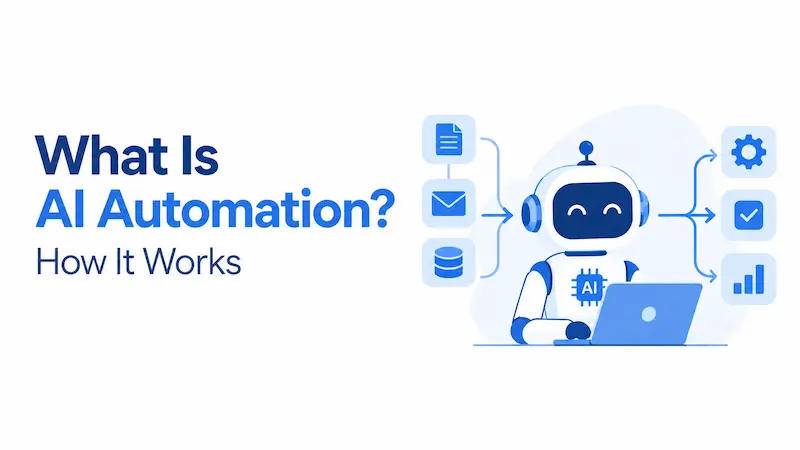
AI automation combines artificial intelligence with workflow software so a system can interpret variable inputs, make or recommend decisions and trigger approved actions. Unlike fixed-rule automation, it can handle unstructured text, images, documents and changing context.
The AI model is only one component. It produces an inference, meaning an output generated from input using a trained model. The surrounding workflow controls triggers, data access, business rules, permissions, integrations, approvals and records. AI automation does not have to be fully autonomous, and it does not necessarily learn while it runs.
This distinction matters as organizations move from AI assistants that suggest answers to connected systems that can take action. More autonomy can expand what a workflow can accomplish, but it also increases the consequences of an incorrect output, an overbroad permission or a compromised input.
Key Takeaways
- AI automation combines AI inference with workflow coordination, business rules and software actions.
- Its main advantage is handling variable or unstructured inputs that fixed rules cannot interpret reliably.
- RPA follows predefined steps, while agentic automation can select steps and permitted tools within defined limits.
- Strong candidates have measurable outcomes, sufficient volume, recoverable errors and clear escalation paths.
- Benefits depend on the task and operating conditions. Evidence from one workplace does not establish a universal productivity effect.
- Reliable deployment requires representative testing, restricted permissions, proportionate human review and post-deployment monitoring.
What Is AI Automation?
AI automation, also called AI-powered automation, places AI capabilities inside a process that can continue without a person completing every step. The AI may classify, extract, predict, detect, recommend, generate or plan within approved limits.
A concise working formula is:
AI automation = AI inference + workflow coordination + controlled action
The OECD definition of an AI system describes a machine-based system that infers from input how to generate predictions, content, recommendations or decisions. It also recognizes that AI systems differ in their degree of autonomy and whether they adapt after deployment. Neither continuous learning nor full autonomy should therefore be assumed simply because a process uses AI.
The surrounding automation may be a business process platform, cloud workflow, custom application, RPA bot or AI agent. It can be narrow, such as routing support tickets, or dynamic, such as using approved tools to investigate an IT incident.
“Intelligent automation” is a related term. IBM describes it as a combination of AI, business process management and RPA. Vendors use these labels differently, so architecture, permissions and autonomy matter more than the product name.
How Is AI Automation Different From Other Automation?
AI automation does not replace every earlier form of automation. Effective systems often combine rules, RPA, AI models and human decisions.
| Approach | How it works | Best fit | Simple example |
| Traditional automation | Executes explicit rules along predefined paths | Stable, structured and predictable work | Send a reminder three days before a due date |
| Robotic process automation | Repeats predefined user actions in digital interfaces | Repetitive work across systems without suitable APIs | Copy approved data into a legacy application |
| AI automation | Uses a model to interpret, predict, generate or recommend inside a workflow | Variable inputs and decisions that cannot be fully expressed as rules | Classify an email, extract details and route the case |
| Generative AI alone | Produces new text, images, audio, video or code from an input | Content creation or assistance | Draft a reply for a person to review |
| Agentic automation | Lets a model select steps and invoke permitted tools to pursue a goal | Dynamic, multistep work with changing conditions | Investigate a support issue and prepare a proposed resolution |
RPA and AI are complementary. RPA executes predefined instructions, while AI can interpret variable data before the bot continues. The Google Cloud explanation of RPA makes the same distinction between rule-based execution and AI-based inference.
Generative AI is not automatically automation. A chatbot drafting an email has generated content. It becomes part of automation when a trigger calls it, controls validate the output, and software routes, stores or acts on the result.
Here, agentic automation means a more autonomous form in which a model directs part of the process and chooses among approved tools. Anthropic’s guidance on workflows and agents recommends the simplest architecture that works because agents trade predictability, speed and cost efficiency for flexibility.
What Technologies Power AI Automation?
AI automation is a system of connected technologies rather than one model or product.
| Component | Role in the workflow |
| Machine learning and statistical models | Classify records, predict outcomes, detect anomalies and forecast demand |
| Large language models and natural language processing | Interpret, summarize, retrieve and generate language |
| Computer vision and optical character recognition | Process images, scans and variable document layouts |
| Workflow coordination | Manage triggers, branches, approvals, retries and exceptions |
| APIs and RPA | Connect applications and execute approved actions |
| Identity, policy and monitoring systems | Restrict access, validate actions, record outcomes and detect failures |
Not every workflow needs a large language model. A smaller classifier, forecasting model, document model or rules engine may be cheaper, faster and easier to evaluate. The technology should be selected for the task rather than for its novelty.
How Does AI Automation Work?
A robust design usually combines variable AI outputs with fixed software controls. The model handles ambiguity. Conventional software enforces identity, permissions, transaction limits, validation, approvals and recordkeeping.
1. A Trigger Starts the Workflow
A trigger may be a new email, uploaded document, customer message, sensor reading, scheduled time, database change or employee request. The workflow should record what started the process, who or what initiated it, and which policy applies.
2. The System Collects and Prepares Context
Connectors retrieve permitted information from documents, databases, sensors or applications. Preparation may standardize formats, apply optical character recognition or redact sensitive fields. Incomplete or malicious input should be stopped before it affects later steps.
3. An AI Model Produces an Output
The selected model produces something the workflow can use, such as a category, extracted field, risk score, anomaly, draft or task plan. It should be evaluated on the actual job. A generic benchmark cannot establish performance in a live business process.
4. Policy Logic Checks the Output
An AI output is not automatically a business decision. The workflow can check required fields, compare quality signals with thresholds, apply fixed rules and verify the result against a trusted source before allowing the case to continue.
For example, if a model extracts a total of $4,850, separate code should verify the currency and arithmetic, match the supplier and purchase order, and enforce the approval limit. The model should not be the sole authority over a transaction.
5. The Workflow Acts, Abstains or Escalates
Low-risk cases that pass validation may continue automatically. Ambiguous, unusual or high-impact cases should go to an authorized reviewer. A well-designed system can abstain instead of forcing an answer.
Human review should reflect consequence and reversibility. Reviewing a draft is different from approving a payment or changing production infrastructure. Google’s human-in-the-loop architecture guidance likewise places review at defined checkpoints for critical or subjective actions.
6. Connected Software Executes the Approved Action
The workflow may update a database, create a ticket, call an API or instruct an RPA bot. Sensitive actions need minimum-access credentials, transaction limits and an audit trail connecting the AI output with the final action. Operations should be safe to repeat, reversible or supported by rollback where possible.
7. Monitoring Creates a Feedback Loop
Subject to privacy limits, logs should capture model versions, tool calls, approvals, exceptions, costs and downstream outcomes. Corrections can support later improvement, but feedback collection is not automatic retraining.
In March 2026, NIST reported that pre-deployment evaluations cannot reproduce every real-world condition and that AI outputs may vary for the same input. Its research on post-deployment AI monitoring identifies functionality, operations, human factors, security, compliance and large-scale impacts as separate monitoring areas. NIST also says that validated monitoring methods and shared terminology are still developing. Monitoring should therefore be treated as an active discipline, not a completed checklist.
What Is a Simple Example of AI Automation?
Consider an accounts-payable inbox. When an invoice arrives, the workflow checks the file type and scans it for malware. Document AI then classifies the document and extracts the supplier, purchase order, tax, currency and total. Fixed software rules verify the arithmetic and compare the fields with approved supplier and purchasing records.
If the data matches and the amount falls within an authorized threshold, the workflow can create a draft entry in the finance system. A missing purchase order, duplicate invoice, uncertain field or unusual bank detail sends the case to a reviewer with the original document and the reason for escalation. Only after the required approval does the system schedule payment and store an audit record.
This is an illustrative workflow, not a claim about a specific product. AI handles document variability, rules enforce policy, and a person controls consequential exceptions. This is more reliable than asking one model to process the invoice from beginning to end with unrestricted access.
Does AI Automation Learn by Itself?
Not necessarily. Four activities are frequently confused.
Training creates or adjusts a model from data. Inference uses the trained model to produce an output. Feedback collection records whether the output was useful or correct. Retraining updates the model later using reviewed data or another controlled process.
Many production systems use a fixed model version during inference and improve only after scheduled evaluation, approval and release. Some systems use online learning or other adaptive components, but that is an architectural choice requiring additional validation, monitoring and rollback controls.
An agent remembering a previous conversation is also not the same as its underlying model learning. Memory changes the context supplied to the model. Fine-tuning or retraining changes the model itself. The difference matters for privacy, testing, change control and claims about continuous improvement.
How Much Autonomy Should AI Automation Have?
The following capability ladder is an editorial model, not an official standard. It helps teams discuss how much control a system receives. A higher level is not automatically better.
| Level | System behavior | Human role | Appropriate use |
| Rule-only baseline | Follows fixed logic without AI inference | Designs rules and handles exceptions | Stable, predictable work |
| AI assistance | Produces a score, summary, draft or recommendation | Reviews and performs the action | New or consequential uses |
| AI-guided workflow | AI output selects among predefined branches | Reviews flagged cases and samples routine ones | High-volume triage and document processing |
| Bounded automation | Completes approved actions within thresholds and permissions | Oversees outcomes and handles exceptions | Low-risk, reversible and well-tested transactions |
| Agentic automation | Plans steps and selects permitted tools dynamically | Sets goals, limits and approval gates | Variable multistep work where fixed paths are insufficient |
The safest target is the minimum autonomy needed. Use a fixed workflow when the process is known. An agent justifies its complexity only when model-directed planning materially improves the result.
Common AI Automation Examples
| Business area | AI-enabled workflow | Sensible control point |
| Customer service | Classify messages, retrieve approved knowledge and draft replies | Escalate complaints, unusual cases and uncertain answers |
| Finance operations | Extract invoice data, match records and detect anomalies | Require approval before payments or supplier-detail changes |
| IT operations | Summarize alerts, gather diagnostics and propose remediation | Approve privileged or production-changing actions |
| Manufacturing | Analyze sensor data and predict maintenance needs | Let a technician confirm safety-critical work |
| Supply chain | Forecast demand and recommend replenishment | Apply budget limits and review unusual orders |
| Legal and compliance support | Classify documents, extract clauses and flag deviations | Preserve qualified review for legal conclusions and decisions |
| Software delivery | Generate tests, review code and summarize changes | Protect branches and retain human merge approval |
These examples show general patterns, not guaranteed results. The appropriate autonomy level depends on data quality, error cost, reversibility, legal duties and the organization’s ability to monitor the process.
What Are the Benefits of AI Automation?
AI automation can process text, speech, images and documents whose wording or layout varies, removing some manual handoffs between automated steps.
It can reduce cycle time or increase capacity by processing information when a trigger arrives. Value may appear as shorter queues, faster responses or lower review effort. Total cost still depends on model fees, integrations, exceptions, oversight and maintenance.
Applying the same model and policy may support consistency, but consistency is not correctness or fairness. A systematic error can be repeated at scale, so outcomes and error patterns still need measurement.
A peer-reviewed 2025 study in The Quarterly Journal of Economics examined a generative AI assistant used by 5,172 customer-support agents at one company. Access increased resolved issues per hour by 15 percent on average, with larger gains for less experienced and lower-skilled workers. The most experienced workers saw little productivity improvement and small declines in some quality measures.
The original workplace study demonstrates that AI assistance can create measurable value in a real deployment. It does not demonstrate that every AI system, occupation or automated workflow will produce the same result. The appropriate conclusion is that AI can improve specific outcomes under specific conditions, and those outcomes should be measured in the actual workflow.
What Are the Main Risks and Limitations?
AI automation changes the error profile of a process. It may reduce some repetitive manual mistakes while introducing variable model errors, security risks and failures that spread rapidly through connected systems.
| Failure mode | Why it happens | Useful controls |
| Incorrect classification, extraction or generation | The input is ambiguous, unfamiliar or outside the tested range | Representative evaluation, source checks, abstention and review thresholds |
| Data or concept drift | Live data changes, or the relationship between inputs and outcomes shifts | Outcome monitoring, drift checks, periodic reevaluation and rollback |
| Automation bias | Reviewers defer to a plausible system output | Reviewer training, visible evidence, adequate review time and override tracking |
| Unequal performance | Data, labels or design choices produce different error rates across groups | Segmented testing, impact assessment and complaint or appeal routes |
| Privacy or confidentiality loss | Sensitive data reaches models, logs, vendors or unauthorized users | Data minimization, access control, retention limits and vendor assessment |
| Prompt injection or tool misuse | Untrusted content influences a model that can call tools | Input isolation, tool allowlists, minimum permissions and sensitive-action approval |
| Cascading action errors | An uncertain output triggers downstream transactions | Limits, dry runs, staged execution and rollback |
| Cost, latency or dependency growth | Model calls, retries, review queues and integrations accumulate | Budgets, smaller models, caching, timeouts, fallbacks and cost monitoring |
Agentic systems require added caution because they can select tools and actions while running. The OWASP Top 10 for Agentic Applications 2026 highlights risks including goal hijacking, tool misuse, identity and privilege abuse, memory or context poisoning and cascading failures. These are system-level risks, not simply model-accuracy problems.
Security should cover the full lifecycle. The UK National Cyber Security Centre’s secure AI development guidance addresses secure design, development, deployment, operation and maintenance, including supply-chain controls, documentation, incident processes, logging and monitoring.
How Do You Choose a Good Process to Automate?
Start with the work, not the tool. A stronger candidate has a definable outcome, detectable errors and a way to intervene when the system is uncertain.
| Selection question | Favorable signal | Warning signal |
| Is the goal clear? | Success and failure can be described | Stakeholders disagree about the desired outcome |
| Is the volume meaningful? | The task recurs enough to justify build and oversight costs | It is rare or changes before costs can be recovered |
| Are outputs measurable? | Quality can be compared with reliable labels or outcomes | “Looks good” is the only acceptance criterion |
| Are errors recoverable? | Actions can be reviewed, reversed or contained | One error can cause irreversible harm |
| Is representative data available? | Normal cases, exceptions and relevant groups are covered | Historical data is sparse, biased or legally unusable |
| Can the system abstain? | Uncertain cases have a staffed escalation route | Every case must receive an automated answer |
| Are integrations controlled? | APIs, identities and permissions can be restricted and logged | The system needs broad shared credentials |
| Is there an accountable owner? | One team owns outcomes, incidents and model changes | Responsibility is divided or unclear |
High volume alone is not a reason to use AI. If ordinary rules solve the problem reliably, use them. Add AI only where interpretation, prediction or generation creates enough additional value to justify new uncertainty.
How to Implement AI Automation Responsibly
1. Map the Process, Baseline and Boundaries
Document triggers, decisions, exceptions, handoffs and failure points. Measure current cycle time, cost, error rate and rework. Define what the system may recommend or do, what it must never do and when it must escalate. Without a baseline and boundaries, a faster demonstration cannot prove that the overall process improved.
2. Use the Simplest Effective Architecture
Automate predictable steps with conventional code. Add AI only where rules cannot handle the input efficiently. Begin with assistance or a fixed workflow before granting dynamic planning or write access.
3. Evaluate the Whole System on Representative Cases
Test normal work, rare exceptions, missing fields, conflicting instructions, adversarial inputs and relevant user groups. Measure the actual business output rather than relying on a generic model benchmark. A document workflow may need field-level precision and recall, duplicate-detection performance and payment-error rates rather than one overall “accuracy” score.
4. Build Controls Into the Pilot
Use minimum-access identities, approved tools, transaction limits, source checks, output validation, audit logs and a reliable stop mechanism. Give reviewers the original evidence, proposed action, reason for escalation and authority to reject it. Track whether review becomes a bottleneck or a rubber-stamp exercise.
Begin in shadow mode, where the system produces outputs without acting, or in decision-support mode, where a person remains responsible. Compare recommendations with real outcomes. Increase autonomy only after predefined quality, risk and operational thresholds are met.
5. Monitor Outcomes and Manage Change
Track model, prompt, data, policy and integration versions. Reevaluate after model updates, process changes or new user behavior. Maintain incident response, rollback and vendor-exit plans.
The NIST AI Risk Management Framework is a voluntary resource for incorporating trustworthiness considerations into AI design, development, use and evaluation. As of August 2026, NIST states that AI RMF 1.0 is being revised, so implementers should confirm the current framework version and relevant profiles before relying on them.
How Should AI Automation Be Measured?
An automation can appear successful while moving work into an exception queue or reducing quality. Use a balanced set of measures.
| Dimension | Example measures |
| Quality | Precision, recall, field-level accuracy, factual-error rate and successful completion rate |
| Operations | End-to-end cycle time, backlog, straight-through rate, exception rate and uptime |
| Human impact | Review time, override rate, workload, training needs and affected-person feedback |
| Financial value | Cost per completed case, avoided rework, additional capacity and total cost of ownership |
| Risk | Unauthorized actions, privacy events, complaints, appeal outcomes and performance disparities |
A useful value equation is:
Net value = time saved + avoided losses and rework + additional capacity or revenue − model, integration, review, monitoring and change costs
Use verified outcomes from the deployed process. Token cost or time saved at one stage does not capture total return if people must repair outputs later.
Conclusion
AI automation is the use of AI inference inside an engineered workflow that can move from input to controlled action. It works best when AI handles the ambiguous step, conventional software enforces predictable rules and people retain authority over consequential exceptions.
The evidence does not support treating AI automation as a universal productivity switch. Results depend on the task, data, workflow design, user group and controls. Greater autonomy also expands security, reliability and governance demands.
Start with one narrow process, a measurable baseline and recoverable errors. Automate predictable steps first, add AI only where it produces verifiable value and increase autonomy only after representative testing.
The goal is not the most autonomous system. It is the simplest controlled system that measurably improves the work.